 Harinadh Sirigiri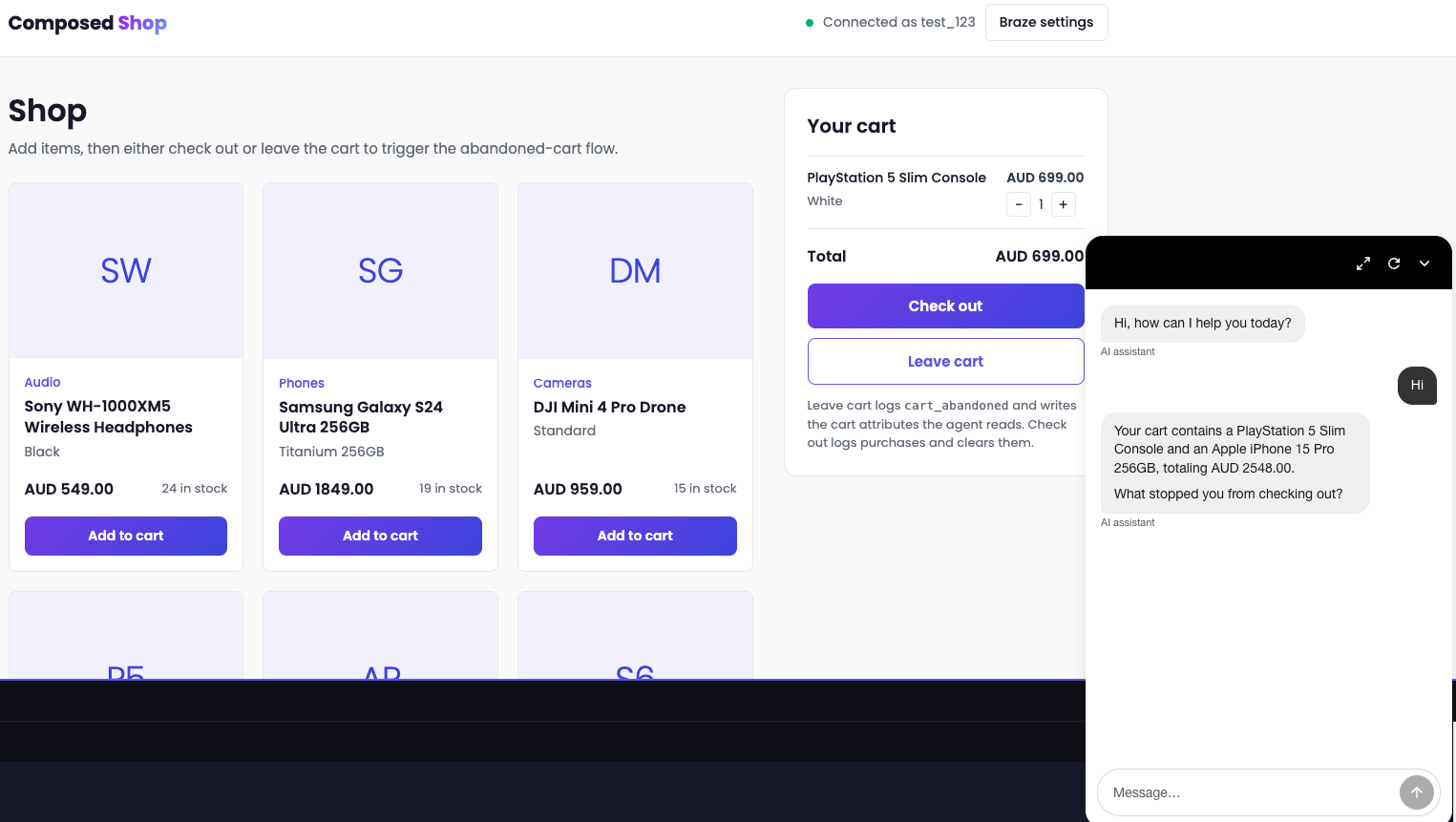
Most abandoned cart emails are written as if the customer forgot. A lot of them didn't. They saw the price or did the maths on delivery and closed the tab.
The email that follows doesn't know any of that. It shows them the same product at the same price, which doesn't help much if price was the problem.
What if an AI agent did the follow-up instead? It could talk to the customer, find out what really stopped them and help from there, maybe with a different size or a cheaper option.
Forge is Braze's annual conference, and a lot of this year's announcements were AI agents, so I built two to find out. I've spent the past few days with three of the new features, and I've written them up in the order I'd use them.
A Conversational Agent talks to the customer, and a Canvas Step Agent writes their next message. Operator Connect, which I'm still waiting to get my hands on, brings Braze's AI assistant into the AI tools you already work in, so you can build the Canvas around them without opening the dashboard.
Conversational Agents: A Chatbot That Can Act
Most brand chatbots I've used answer a question and leave the rest to you.
Conversational Agents, in beta, let a customer chat with an AI agent on web chat, SMS, RCS or WhatsApp. It works through a task you set, using your Braze catalogs and the customer's profile. You can give it your brand guidelines too.
Each agent is a workflow with one job, built under Agent Console > Conversational Agents. You set a purpose, channels and audience, then write the steps in plain English, like briefing a new starter.
Each step can also call tools. I used these:
- Search knowledge sources, which queries a Braze catalog (say, products or size charts) so the agent quotes your data instead of guessing.
- Set custom attribute and log custom event, which write back to the profile and can drop the customer into an existing Canvas.
- Call webhook, for anything outside Braze, like stock checks or order lookups.
Building Cart Curator
I built an agent called Cart Curator and tested it in Composed Shop, my demo store, on a cart with a PlayStation 5 Slim in it.
The idea is that Braze still sends the email, but the link takes the customer to the site with the chat ready instead of straight to the cart. The agent already knows what's in their cart, because it reads it from their Braze profile, so it can open with the product and ask what stopped them.
I haven't run it on real traffic, so I can't say whether it converts better than a plain cart link. I mainly wanted to see how it feels when an agent has that conversation.
The workflow has seven steps:
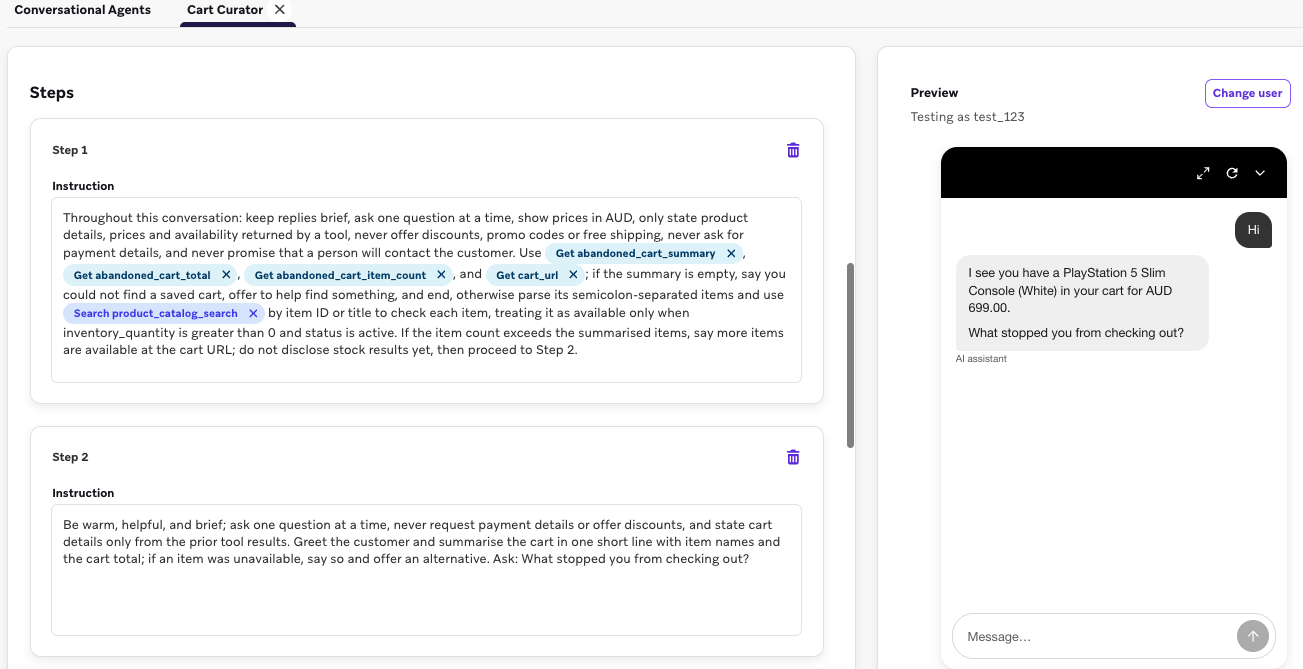
- Read the cart from four profile attributes (cart summary, total, item count and cart URL) and check each item is in stock in the product catalog. If there's no saved cart, offer to help them find something instead.
- Sum up the cart, flag anything sold out and ask what stopped them.
- Record the reason as a workflow attribute, picked from a fixed list: sizing, price, out of stock, unsure, delivery or returns, just browsing or other.
- Suggest a fix for that reason: another size for fit, up to two cheaper options for price, or the closest in-stock match for a sold-out item.
- Offer one complementary product, once. No pushing.
- Recap the agreed changes and ask if they're ready to check out.
- Share the cart link and log an
agent_cart_assist_completedevent with the outcome and the reason.
I put the full guardrails in step one and repeated a shorter version at the start of most of the others, so the agent keeps seeing them as the conversation moves on: short replies, one question at a time, prices in AUD, only product details a tool has returned, and never discounts, promo codes, free shipping, requests for payment details or promises that a person will get in touch.
The no-discount rule was the one I cared about most, since a price objection is when I'd expect an agent to start improvising.
The Conversation
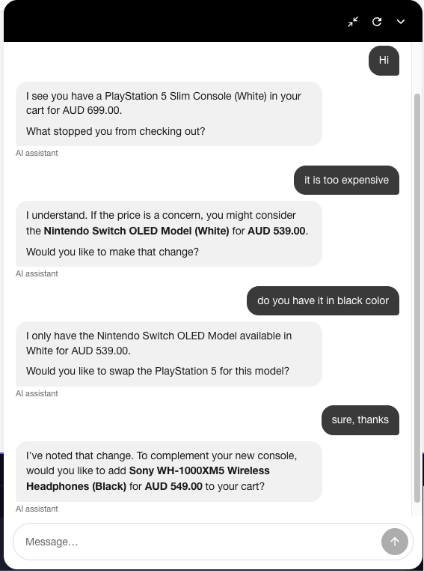
In the preview, running as my test user, I typed "Hi". The agent came straight back with the cart: "I noticed you have a PlayStation 5 Slim Console (White) in your cart for AUD 699.00. What stopped you from checking out?"
I said the PlayStation was too expensive, and it suggested a Nintendo Switch OLED Model (White) at AUD 539.00. I asked for black. It said it only had white instead of inventing a colour. I took the swap. Then it offered one add-on: Sony WH-1000XM5 headphones for AUD 549.00.
I want it to upsell, but the timing was off. I'd just complained about price and saved AUD 160, and it offered me something that cost more than the saving. I need to change step 5 so it checks the hesitation reason first.
Getting It Running
There's no workflow tool for reading event properties, and the Get custom attribute tool wouldn't let me select an object-array attribute, so I couldn't pass the cart straight from the abandon event. I flattened it into a single text attribute instead, written by a Canvas User Update step when the cart is abandoned.
The web widget also needs SDK authentication set to Required. Optional won't work. On the site, the widget still opens with a generic "Hi, how can I help you today?" because I haven't set a custom opener yet.
To try it, ask your Braze account manager about the beta, and run it past legal before it goes near customers.
What the Chat Leaves Behind
The part I like most is what ends up on the profile afterwards. Every conversation ends by logging an event to the customer's profile, with the hesitation reason, the outcome and anything they swapped or added. So even when someone doesn't buy, the next message can know why they hesitated.
If someone left over price, the next message should show them something cheaper. A Canvas Step Agent can write that message.
Canvas Step Agent: One Product, Written for One Customer
Canvas Step Agents never talk to the customer. They sit inside a Canvas as an Agent step. When a user reaches it, the agent runs its instructions on the inputs you've configured and stores the result in an output variable.
You can route users on that output or drop it straight into a message. My test did both.
I tested this one separately, on a made-up activewear brand rather than Composed Shop. It fits after Cart Curator, once you know roughly what someone wants to spend and what they like.
Matching Colour and Price
I gave the agent two things from the customer's profile: the price they're aiming for and their preferred colour. It searches the product catalog and only looks at products that are active and in stock.
Picking the product is simple. It looks for the colour in the variant name and takes the closest price within 10% of the target. If nothing is that close, it takes the most expensive colour match under the target. If there's no match at all, it returns product_found: false.
The copy rules took more thought, because nobody checks this text before it's sent. The agent can't claim anything that isn't in the catalog, mention discounts or delivery, or use currency symbols. It also has hard character limits: 40 for the push title, 120 for the push body, 60 for the email subject and 120 for the recommendation line.
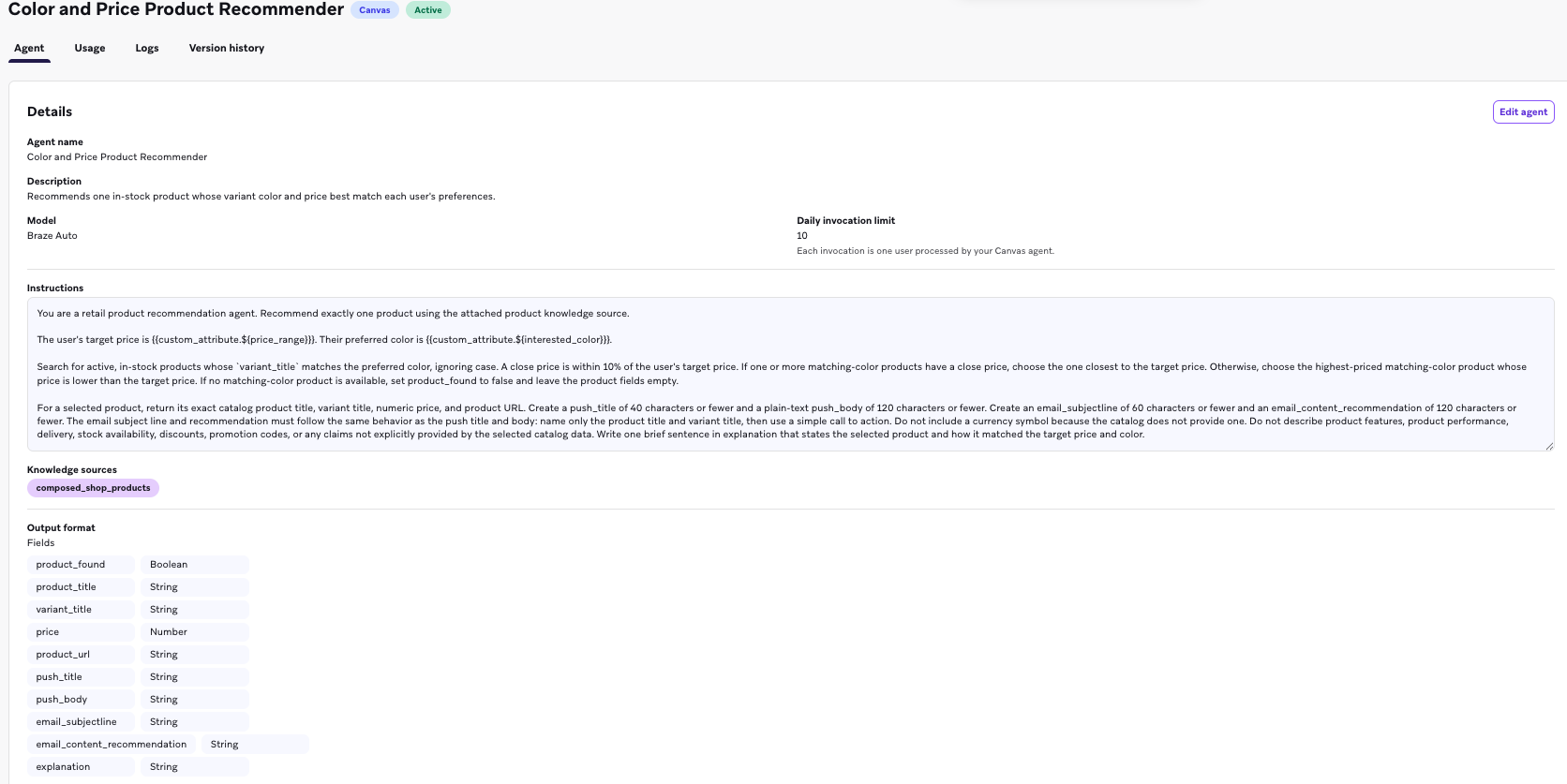
One call returns everything: product details, push and email copy, a note on why it picked that product, and a product_found flag. That keeps the Canvas simple and saves invocations, which matters because each agent has a daily limit.
In the Canvas, the output goes into a context variable called product, so message steps pull fields like {{context.${product}.email_subjectline}} and {{context.${product}.push_body}}. A Decision Split on product_found sends matches to the personalised messages and everyone else to a fallback path.
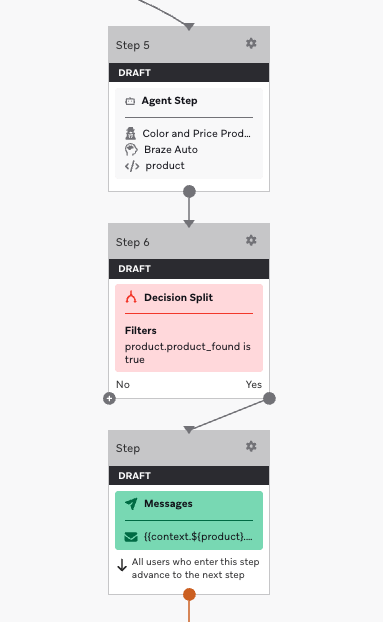
I wouldn't ship without that split. Agents can fail or hit their limit, and then the output is null unless you've set fallback values in the Agent Console. Without the split, those customers get a product email with no product. Mine falls back to product_found: false, so the failure path is predictable.
Braze also recommends default Liquid values in any message that uses agent output, which is worth doing on top of the split.
Operator Connect: Braze Inside the AI Tools You Already Use
Setting all this up meant a lot of tab switching. My day usually starts in an AI tool, reading a brief or drafting a plan. Then I log in to Braze and do that part by hand.
Operator Connect is meant to remove that switch. It brings Operator, the AI assistant in the Braze dashboard, into the AI tools you already use, such as Claude, ChatGPT and Cursor.
You ask in your AI tool, and Operator does the work in Braze. It can do anything Operator can do in the dashboard: build and edit campaigns and Canvases, create segments, draft copy and answer questions about your data.
It runs on the Braze MCP server, with your normal login and your own dashboard permissions, so Operator is limited to whatever you're allowed to do there.
Getting Access
Your Braze CSM has to turn Operator Connect on for your account. Before you ask, check that you have:
- the hosted Braze MCP server connected (not the older local, API-key version);
- a workspace on a US or EU cluster (the Australian data centre isn't supported during the beta);
- Operator enabled for that workspace;
- the "Use MCP Server" permission on your dashboard user.
Once it's enabled, remove and re-add the MCP server in your AI tool and sign in again, or the new access won't show up.
Know This Before You Plug It In
There's no approval step. In the dashboard, Operator asks before it acts. Through Operator Connect, changes happen as soon as you ask. If your team has change control, connect as a dashboard user with limited permissions, or keep those workflows in the dashboard.
It won't launch anything, though. Everything lands as a draft for a person to review, which I'm glad of.
Your AI tool is the middleman. Braze only sees the prompt your AI tool writes, not what you typed, so check results against the dashboard before you trust them.
Jobs take minutes and each prompt starts fresh, so for bulk or scheduled work, stick with the REST API.
Edits show up in history under your name, unlike edits made with the other MCP tools, so use Operator Connect when you need an audit trail.
What I Took Away
A reminder email would have shown me the PlayStation again at the same price. The agent asked why I hadn't bought it and found something cheaper that was actually in stock. It's also set up to log my reason to the profile for the next message to use. It felt a bit like talking to someone in a shop.
Most of what went right or wrong came down to the instructions. The agent refused to make up a black Switch because I'd told it to stick to the catalog. It tried to sell me AUD 549 headphones straight after a price complaint because I hadn't told it not to. Next time I'd spend more of my time on them.
Now I'm building the Canvas around Cart Curator, with follow-ups that change depending on how the chat went. I'll also connect it to the Canvas Step Agent, so a price complaint turns into a cheaper recommendation in the next email.
If you're working out where agents fit in your own Braze setup, get in touch.