 Kyle Wu
By the time anyone called a winner, the sale had often ended or the reason for sending that email had passed, so the result described a moment that was already over.
Plenty of teams still work this way. When open or click rates drop, they ask why and reach for a manual split test to find out. If that cycle is still the default for your always-on journeys, the testing process itself may be costing you more than any single subject line.
Smarter testing with Content Optimizer
Content Optimizer is Braze's answer to that process. Rather than testing one element at a time, you add a single step to your Canvas and load it with variants for the components you want to test. Braze sends every possible combination and keeps shifting more of your audience towards whatever's performing best while the journey is live.
Setting it up
To add it, drag the step into your Canvas. It works across email, push and SMS/MMS/RCS.
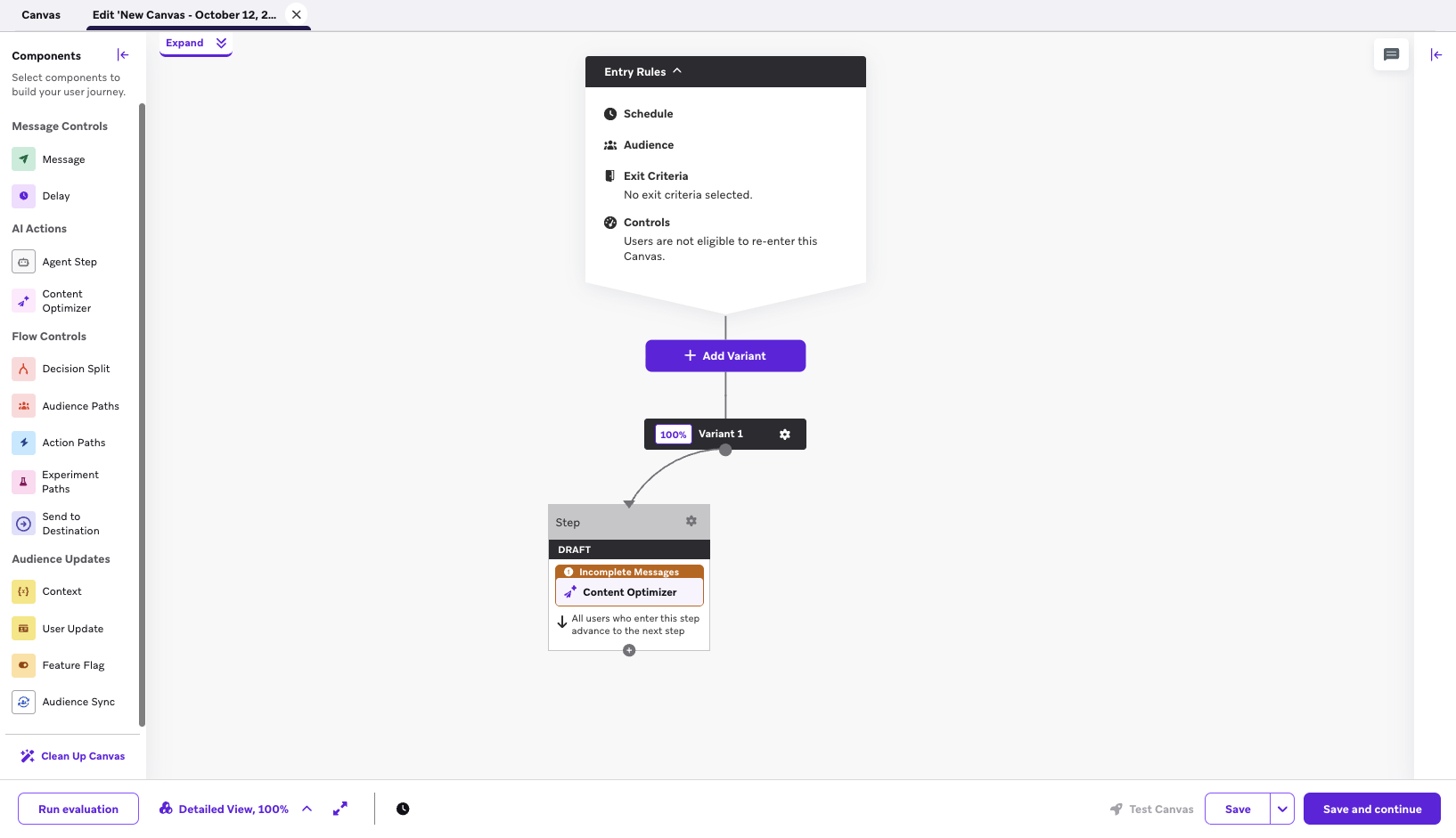 Content Optimizer sits under AI Actions in the Canvas components panel
From there, you choose the components you want to optimise (up to four for email), such as the subject line, preheader, body content, or primary CTA. Each component can hold up to five variants.
Write them yourself or click Generate AI suggestions and let BrazeAI draft them against your workspace brand guidelines. Either way, you decide what goes out. Each component then gives you a Liquid snippet to paste where that copy should appear in the message, and voilà.
Here's how that looks for a retail brand running an abandoned cart Canvas:
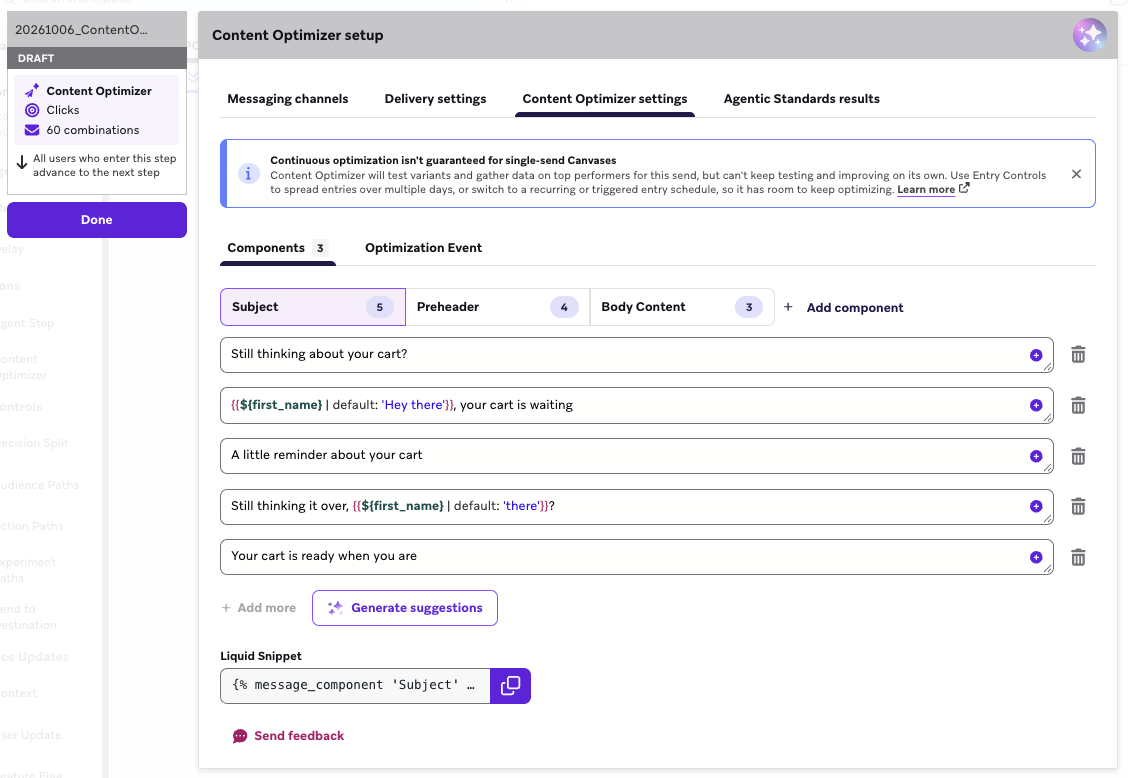
The Subject component at its five-variant limit, two of them personalised with a Liquid fallback, with Generate suggestions underneath.
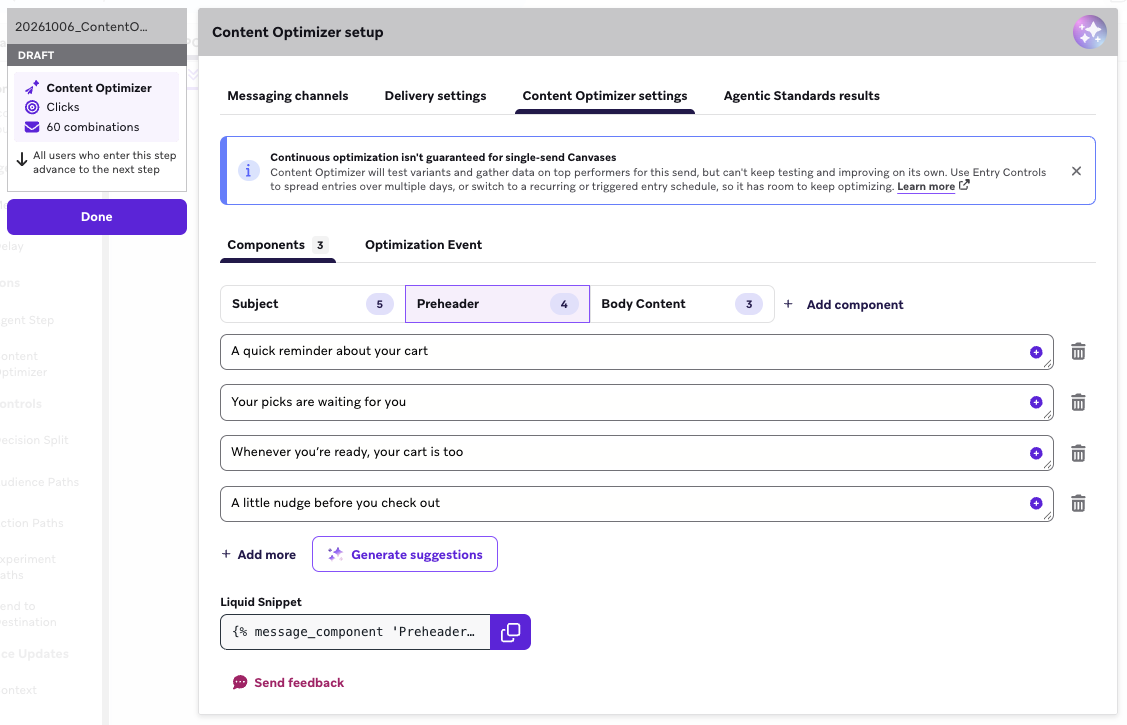
That's 5 × 4 × 3 = 60 combinations, optimising for either clicks or opens. Components don't need the same number of variants, so you can write more where you have ideas and fewer where you don't.
How it finds the winner
When the step launches, Content Optimizer sends combinations largely at random to gather early data. It stays in a Learning state for between seven and 15 days, then moves to one of two states:
• Optimizing: more sends shift towards the best-performing combinations, and the weak ones are phased out.
• Action Recommended: no clear winner has emerged, and it’s over to you.
On paper it sounds like set and forget, and mostly it is. After testing it ourselves and reading the fine print, though, we found a few details that can stop it from finding a winner.
1. It picks one winner for everyone. Content Optimizer finds the best combination for the whole audience. If you want different creative or send times per customer, Decisioning Studio is the better fit.
2. It needs a steady flow of entries. Content Optimizer learns as people trickle into the Canvas, so it suits Canvases with consistent daily entries: daily recurring, event-triggered or API-triggered. Drop your whole audience in at once, like a one-off promo or a monthly send, and there's no one left to send the winner to once it's found.
3. Leave it alone during Learning. Once launched, you can add, deactivate or reactivate variants (still five per component). You can't change the text of active variants, the components being tested or the optimisation event. Publishing any change resets the optimiser, so avoid edits in the first seven-plus days. Historical results stay in the Content Analytics tab.
On the Free plan, each workspace can run one active Content Optimizer step at a time. Your Braze CSM can tell you what's involved in running more.
Where this leaves the marketer
Content Optimizer still needs your judgement, just earlier in the process. Your job moves from picking the winner to writing variants worth testing, because five weak subject lines can only produce a weak winner.
Once you've decided what to send, someone still has to check it's right. Look closely at the setup screen and there's a tab next to the settings for that: Agentic Standards results.
Agentic QA with Agentic Standards
Right now that check usually falls to a person working through a checklist line by line before anything goes live. Is the naming convention right? Are the tags on? Does every Liquid tag have a default? Is the unsubscribe link there, the alt text filled in, the "T&Cs apply" line on the promo?
The checks themselves are easy, but there are a lot of them, and they often land on one person late on a Thursday before launch. Miss one, and "Hi {{first_name}}" lands in 50,000 inboxes as "Hi ,".
Agentic Standards turns that checklist into something Braze runs for you. You write your QA rules once, in plain English, and an AI agent checks your campaign or Canvas against them before launch and tells you what failed and why. It's currently in beta and lives in Agent Console, with separate standards for campaigns and Canvases.
Setting it up
A standard is a set of rules grouped into rulesets. For a Canvas, the rules work at two levels:
• Canvas configuration rules are checked once for the whole Canvas, covering things like naming, tags and send settings.
• Canvas step rules are checked on each matching step: Message steps, Content Optimizer steps and Audience Paths steps. These cover things like subject lines, preheaders, Liquid fallbacks, unsubscribe links and alt text.
Each standard holds up to 15 rulesets, with up to 20 rules in each.
For our retail brand, the standard might include rules like:
• No dead-end steps: every step in the Canvas connects to a next step.
• Subject line present: every email has a subject line, and it isn't placeholder text.
• UTM parameters present: every link carries the expected tracking parameters
• Personalisation has fallbacks: every personalised attribute has a Liquid default.
You can also attach a Canvas brief (PDF, TXT, MD, CSV or DOCX, up to 15 MB) so the agent understands what the journey is meant to do. Before saving, the Evaluation preview lets you test the standard against an existing Canvas, so you can see whether each rule catches what you meant it to.
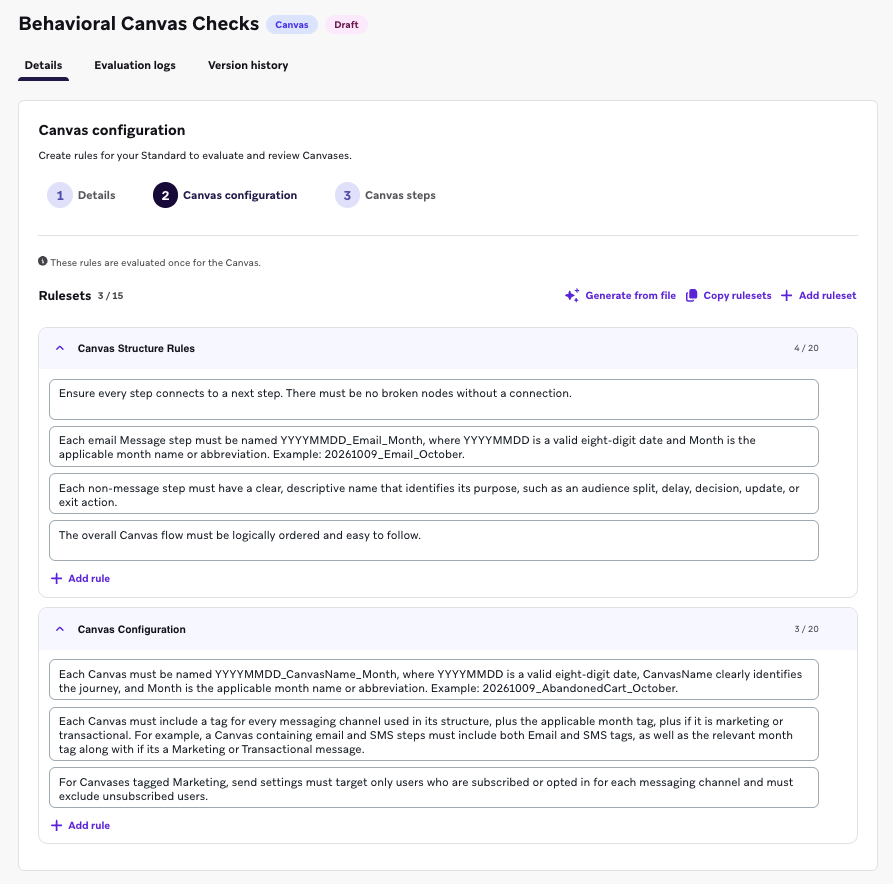
Example of what an Agentic Standard for Canvases might look like
How it checks your work
When the Canvas is ready, you click Run evaluation. Results land in four tabs: Pass, Fail, Warning and Ignored. Each failure names the rule it broke and the reason. From there, you can mark it as fixed, ignore it for this run, or ask Operator to help fix it.
It doesn't hard-block a launch. Critical issues need to be resolved or ignored before you move on, so a person still makes the final call.
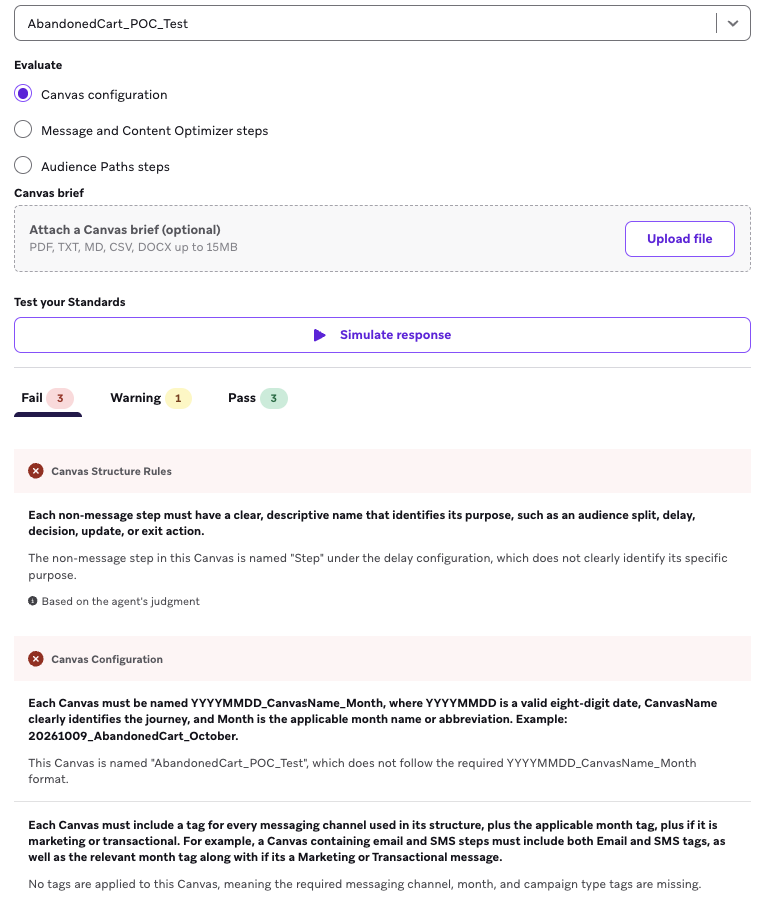
An example of an evaluation: a typo caught in the email heading, flagged against the spelling and grammar rule, then marked as ignored.
Before you switch it on
1. A person still signs it off. Rules handle the things that can be checked mechanically, like field formats and required copy. Whether the journey makes sense or the offer is right still needs a reviewer, so use it to take the repetitive checks off their plate.
2. Write rules like you'd brief a new starter. "Subject lines must be under 50 characters" is a rule the agent can check. "Subject lines should be punchy" is too vague for it to give you a useful result.
3. Every run uses credits. Braze Agents run on credits, and every evaluation is a call to an AI model. That includes preview runs while you're building a standard. From our testing, longer rulesets and bigger Canvases look likely to cost more per run, so keep rules tight and don't re-run on every small edit.
Where this leaves you, the marketer
Content Optimizer takes over the testing, and Agentic Standards takes over the repetitive checks before launch. You still write the variants and make the final call on what goes out.
And hey, I never got to run an A/B test the old way, and after reading those Reddit threads I'm not sure I missed much. The QA checklist, though, I'll happily hand over 😉