 Victoria Taddeo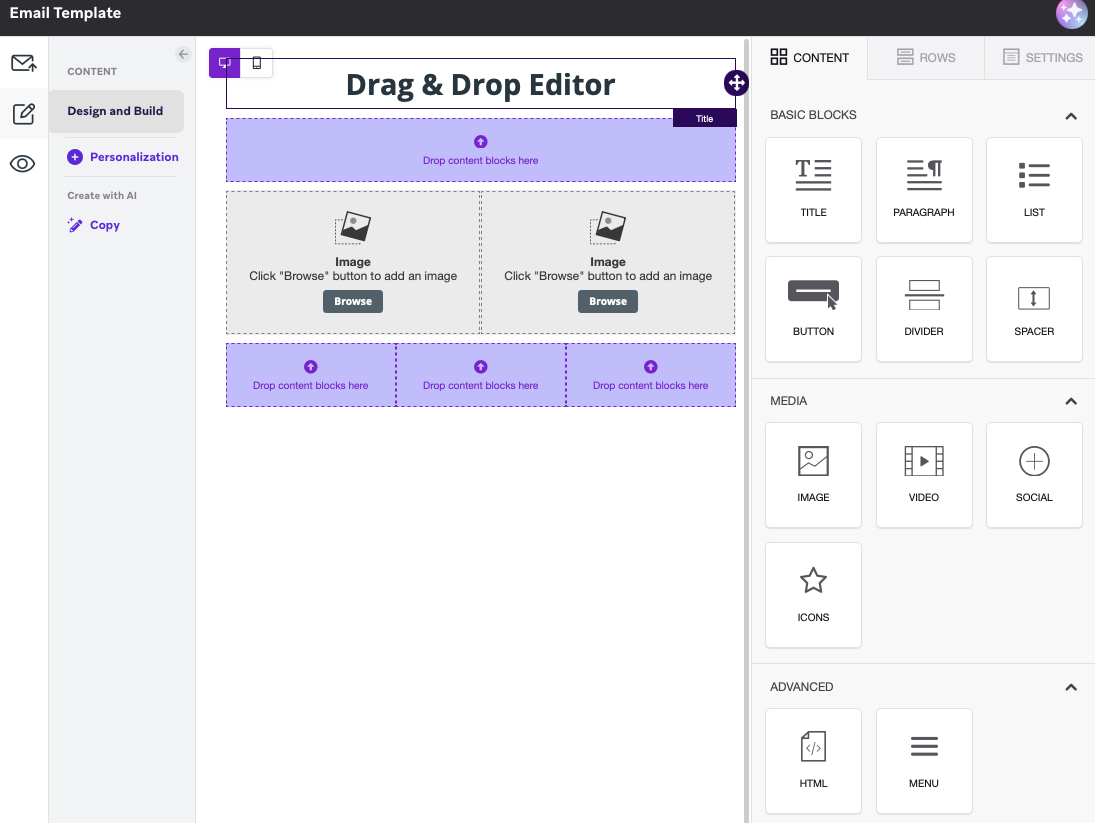
The decision on which method to use to build emails in Braze, either Drag & Drop (D&D) or HTML, has a bigger impact on a business than it might initially seem. It doesn’t just affect how emails look, but how easily a team can build, update, optimise, and scale communications over time.
This decision shapes day-to-day processes and has ongoing implications depending on the method chosen. In this article, we break down what each method looks like in terms of build, the factors that influence which method to implement, and the implications of these methods on a business’s day-to-day activity.
Three methods you can use to build emails in Braze
1. The Drag & Drop Editor
Creating email templates using the Drag & Drop Editor in Braze provides a visual, WYSIWYG (What You See Is What You Get) interface that allows users to create email templates by dragging and dropping email components (title, paragraph, image, button, etc.) or pre-designed content blocks without needing to write any code.
2. The HTML Editor
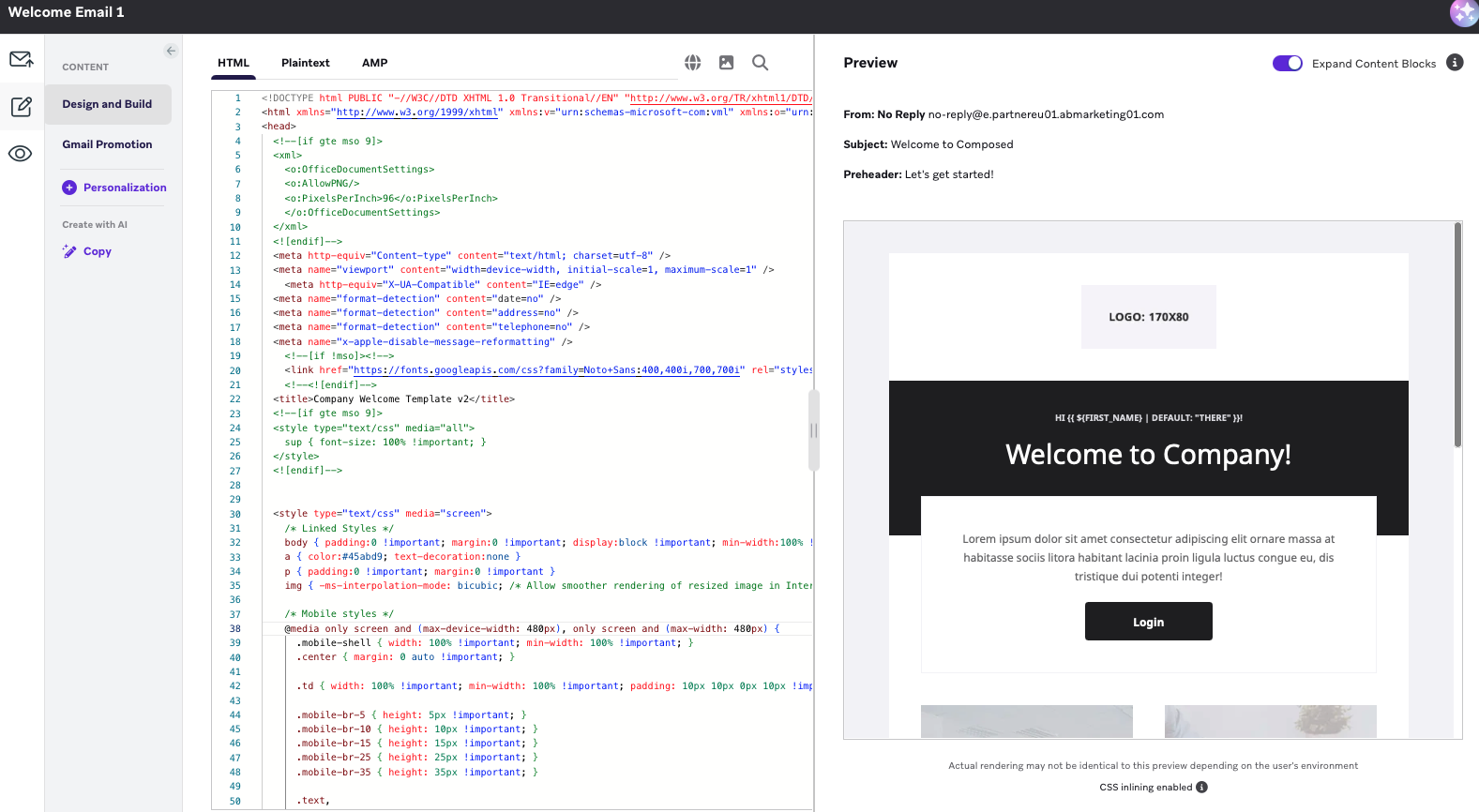
Braze's HTML editor allows you to code the email from scratch or use custom HTML to design the layout, styles, and content exactly as desired.
3. The Combined Approach
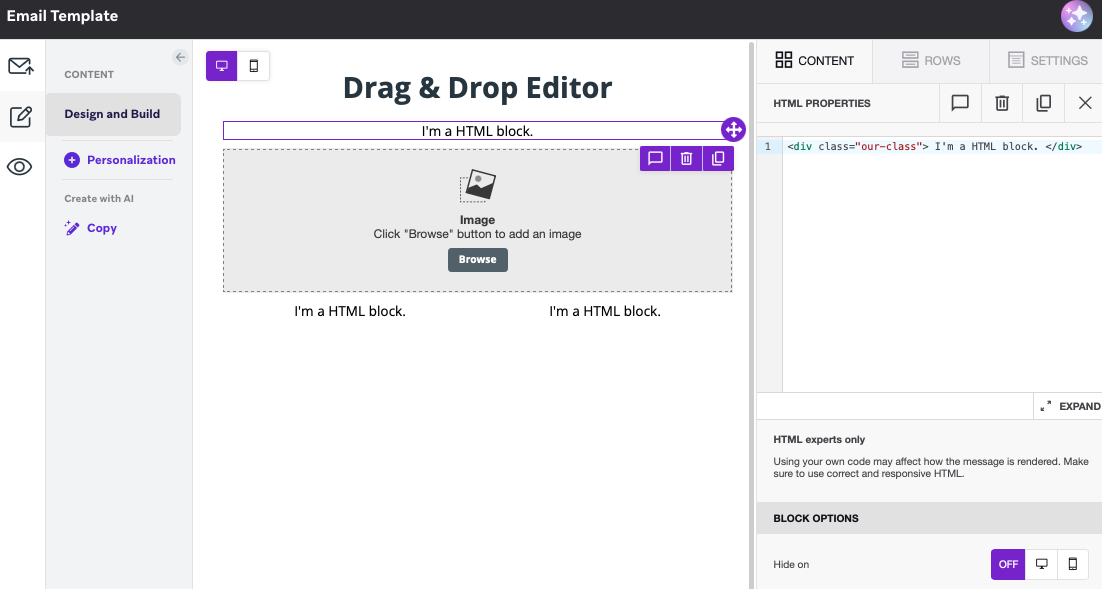
You can also take a combined approach which involves using the Drag & Drop Editor for creating basic email content, while incorporating HTML components to customise specific content blocks within the email that require more advanced design or functionality.
Influences driving which method to implement
Alongside the general considerations of each build method, there are several overarching factors that often influence which method a business adopts upfront. In practice, these considerations can quickly steer teams toward one approach before diving deeper into the nuances of each option. These key influences include:
- The skill set of the team that will be using the platform day-to-day, including whether the business has technical (HTML/CSS) resources available
- The level of customisation and complexity required in the email design
- Whether a mobile-first approach is a business priority as this has implications if using the D&D method and a centralised content block library
Each email build method in detail
Below, we discuss each of the three build methods and what some points of consideration are when deciding what method to implement.
Drag & Drop Editor
If daily users are not familiar with HTML, the Drag & Drop editor offers a marketer-friendly no-code method to build effective, visually appealing emails. Drag & Drop emails are also less time consuming to build from scratch and test, compared to HTML, as the complexities of building with HTML (manual coding, debugging, cross-device testing) are avoided. Within the D&D editor, Braze also offers several pre-designed templates that can be customised to align with the branding of the business – this is a quick alternative to building a D&D email from scratch. While D&D does support device responsiveness, there are however, limitations to be considered if device-specific (particularly mobile) customisation is a priority and the content block liquid tags are used to centralise content blocks – an extremely useful feature that enables emails to be efficiently edited or updated at scale.
Let's break it down.
Imagine you have a header content block containing your logo and it is used across all emails. You know that a rebrand is in the pipeline post-implementation, likely involving a change in the business logo.
For frequently used elements like a header or a footer content block, we typically recommend using the content block via a Liquid tag. This allows you to update an element within a content block once in your content block library, and have it reflected automatically across all emails that are using that content block liquid tag, rather than manually updating each email that contains the header content block.
For context, a content block Liquid tag in Braze looks like this:

Compared to a header content block dragged into the D&D editor:
 However, optimising for mobile becomes tricky when using liquid tags for content blocks built with the Drag & Drop editor. If your content block includes mobile-specific settings, these will not render when the block is inserted via a Liquid tag.
Using the header content block with the brand logo example, the logo may be larger in the desktop version of your email at 200px, compared to the size of the logo image on mobile where it may be 100px.
While D&D allows mobile-specific adjustments, these only apply when the block is directly dragged into the email, not when inserted via a Liquid tag.
There are some workarounds such as applying a Head CSS to your D&D emails, however this does add a layer of technical complexity that teams may have been trying to avoid by choosing to use the D&D editor in the first instance.
The key trade-off to consider is that while D&D simplifies email creation, it can limit how effectively you scale reusable, mobile-optimised content blocks using Liquid. For businesses prioritising efficiency and consistency in their email build, this is an important constraint to factor into the decision.
HTML Editor
If an email design is either highly custom or requires advanced features (such as animation or interactivity), HTML may be the better option. HTML enables more granular control over design, email functionality and device-specific (mobile, desktop etc.) customisation.
HTML emails also introduce some important additional considerations. For example, with heavily customised and complex emails, careful review and testing is required to ensure adequate performance and correct rendering across different email clients and devices. Load time is also an important factor. To ensure the performance of that email once it lands in an inbox, it is recommended to keep HTML emails under 100KB to prevent issues like slow load times, images not loading at all or message truncation.1
Combined Approach
The third method combines the D&D editor's ease of use with the customisable design and functionality from HTML by incorporating HTML components within a D&D email. This can be a great option for a team who may only require a minimal number of blocks to have the customisation one can only get using HTML, while still experiencing the marketer-friendly interface of the D&D editor. An important consideration of the combined method is the HTML component editor in the D&D interface can be clunky to use, so only using this approach for a small number of blocks is recommended. Additionally, using this method requires greater rigour in testing to ensure consistency with styling and device responsiveness is maintained between the HTML blocks and the rest of the email.
| Method | Pros | Cons |
|---|---|---|
| HTML |
|
|
| Drag & Drop |
|
|
| Combined Approach |
|
|
The best method is unique for every business
There's no one-size-fits-all approach when it comes to building emails in Braze. The right method depends on a business's team structure, technical capability, and the requirements of the implementation. Over time, this decision plays a key role in how effectively teams can scale email production, maintain consistency, and onboard new users to Braze.
Ultimately, whether you choose Drag & Drop, HTML, or a combination of both, the method chosen sets the foundation for how your email build team operates. And while there's a lot to consider, it is an exciting step in any implementation, bringing teams closer to that first email landing in customers' inboxes.
If you need guidance with a brand refresh or want to optimise your email build process in Braze, we'd love to help. Reach out to see how we can support your team.
Sources:
https://www.litmus.com/blog/guide-to-email-file-size-and-load-times