 Harinadh Sirigiri
Braze Accounts is now generally available. If you run B2B or B2B2C engagement on Braze, it’s the release I’d look at first.
For years I wondered why more B2B businesses, banks and lenders especially, don’t run their customer engagement on Braze, and why the ones that look at it hesitate to move off the enterprise marketing clouds they already have.
I found one big reason when I was on the Composed team that migrated a banking client from Adobe Campaign Classic to Braze. Braze had no concept of an account. We had to build workarounds to represent brokers and the customers who share family accounts.
Braze was built around the user, which suits B2C. B2B works differently. You sell to a business, and several people inside it need to hear from you, each with a different job. Marketo and other B2B platforms have had custom objects and relationships for years, so teams comparing them with Braze noticed the gap.
Braze held off on purpose. Relationships tend to slow sends down and push you toward SQL and batch processing, and Braze wanted to stay real time. Accounts gets around that by leaving user data in the store that powers Braze’s real-time side and putting account data in Postgres right next to it, with links between the two, so an account update reaches everyone linked to it.
We’ve been testing Accounts at Composed, and I think it removes one of the biggest obstacles for B2B businesses looking at Braze.
To put it through its paces, I built a fictional lender in our demo workspace and loaded it with business accounts and customer relationships, modelled the way a real lender’s CRM would hold them.
Meet Sam. He owns 25 restaurants. Each one has its own loan with its own term end date, plus a manager on site. Sam’s finance manager, Priya, looks after three of them. Every one of those venues is a customer of the same lender.
Plenty of B2B customers look like Sam. The person you message sits inside a business, and often inside several. Until now Braze gave you two ways to handle that, and we’ve had to use both.
The two old workarounds
The first is to copy the business onto the person. Sam’s profile ends up holding an array of 25 venue IDs and a nested object for each one, and every venue manager carries a copy of their venue’s details as well. It works until something changes. Then you’re updating the same loan on every profile that holds a copy.
The second is to message per venue, so Sam gets an email every time one of his venues has a term coming up. That can mean five emails in a month about the same group, each one about a single venue.
What Accounts changes
Accounts gives businesses their own records in Braze. It’s built on Braze’s Data Objects framework, and you’ll find it under Data Settings > Accounts. It’s generally available, but each company has to request provisioning there first. Each venue is stored once, with its own fields, and people link to it. In our demo every venue carries its loan amount, finance product, term end date and status, so the lender’s view of the business lives in one place.
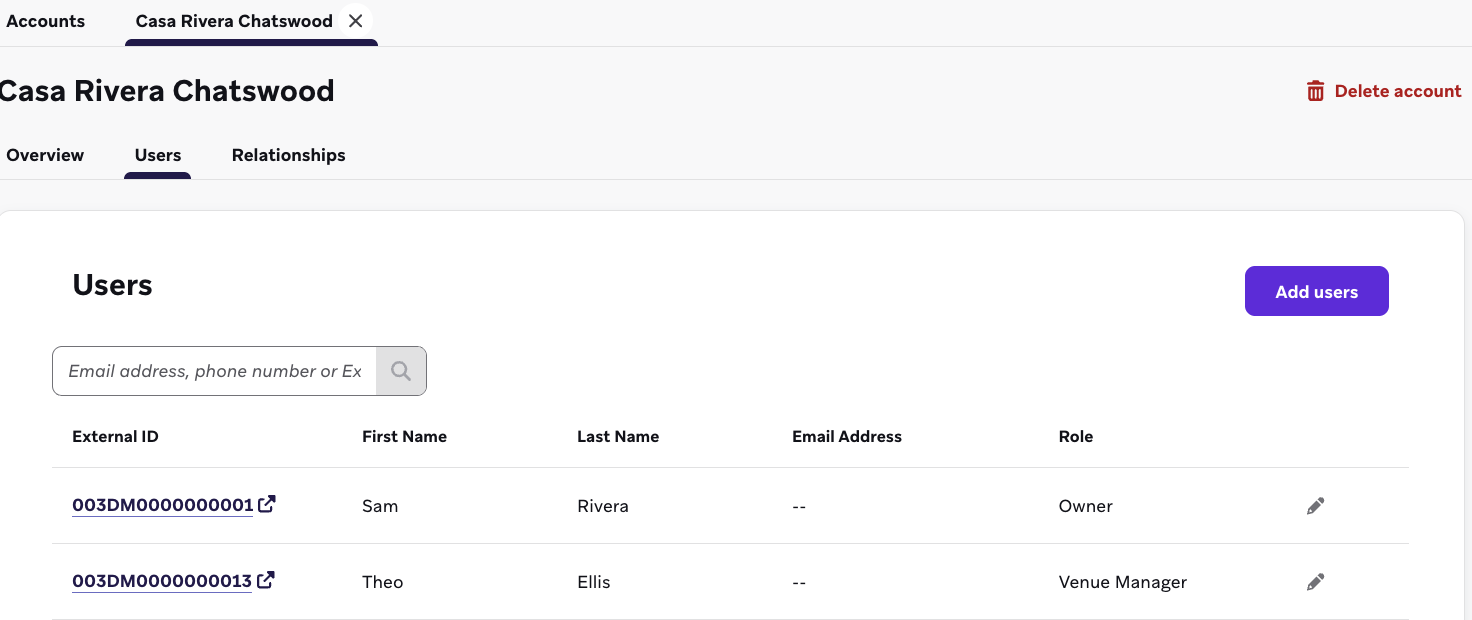
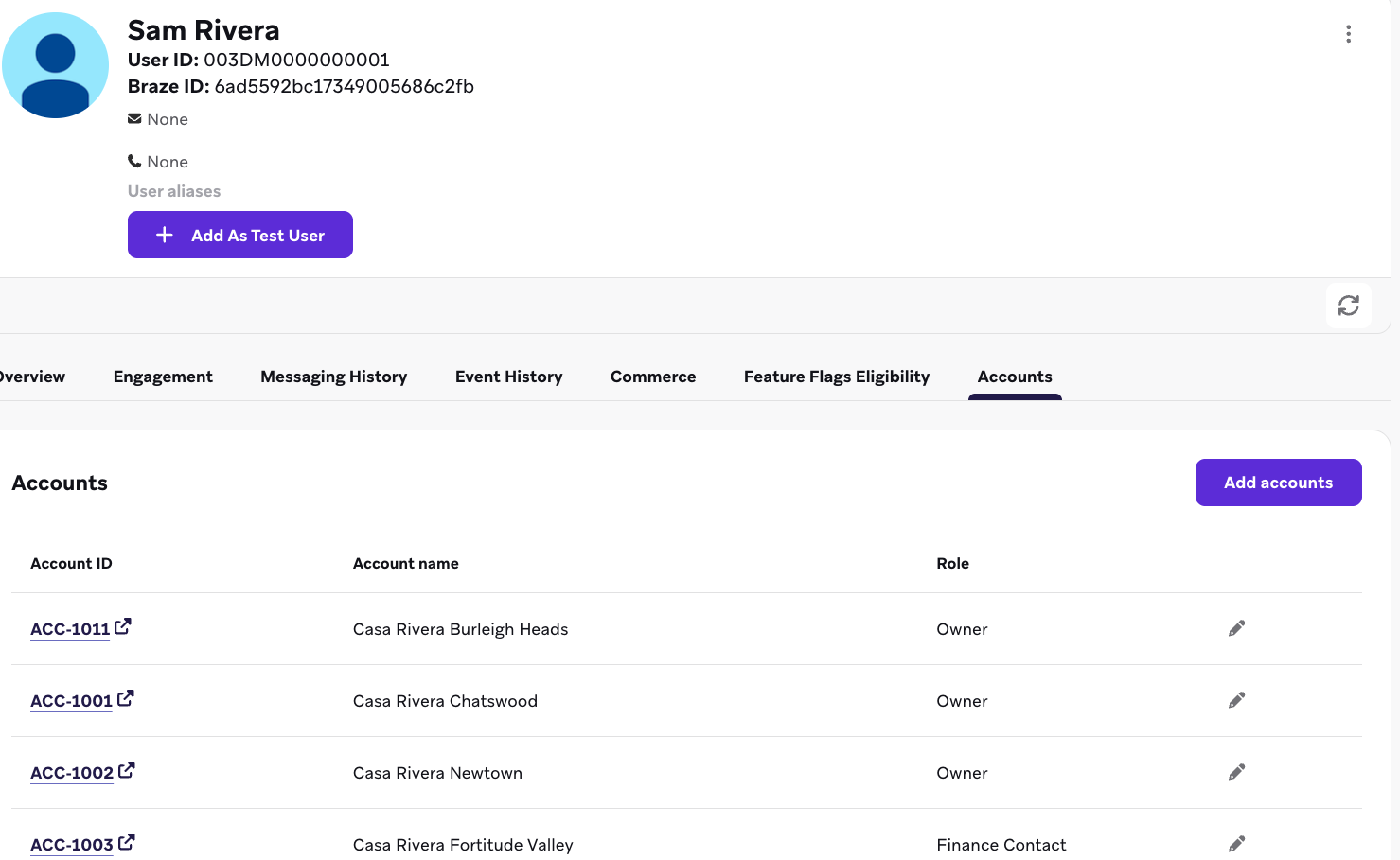
A link between a person and an account can carry a role. Sam is linked to all 25 venues as Owner, and Priya to three of them as Finance Contact. Each venue’s own manager is linked to it as well. Because the role sits on the link, we could build a segment for each role without copying any business data onto profiles.
Accounts can also sit under a parent account, so a group can hold all of its venues in one place. Sam’s group, Rivera Hospitality Group, is a parent account with 25 subaccounts, one for each Casa Rivera venue from Chatswood to Subiaco.
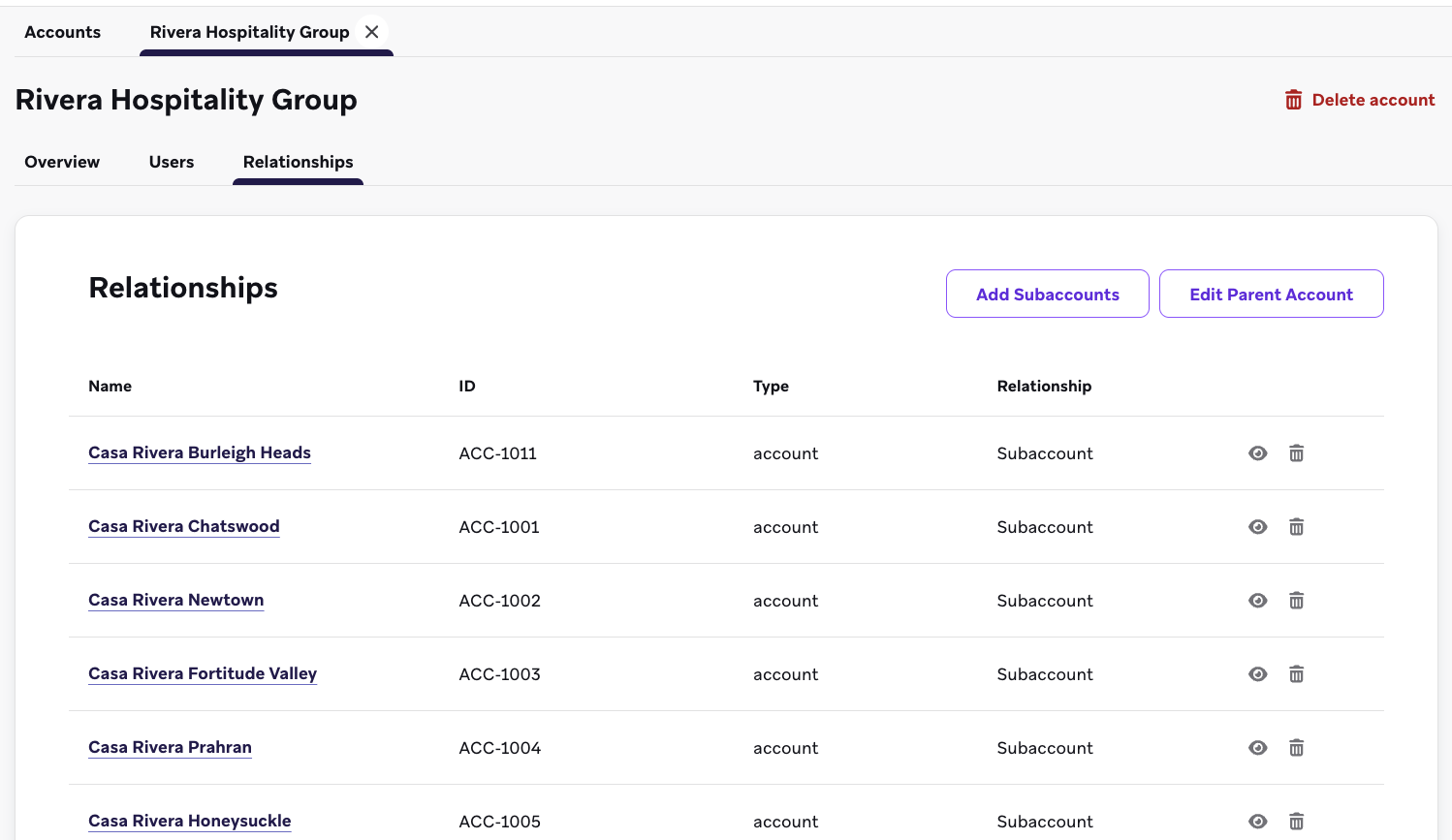
Open any venue and the Users tab shows who is linked to it and in what role. Open Sam’s profile and there’s an Accounts tab listing everything he’s linked to.
In a message, a single Liquid tag pulls in the accounts linked to whoever is receiving it. The renewal email further down is built on that one tag.
The demo
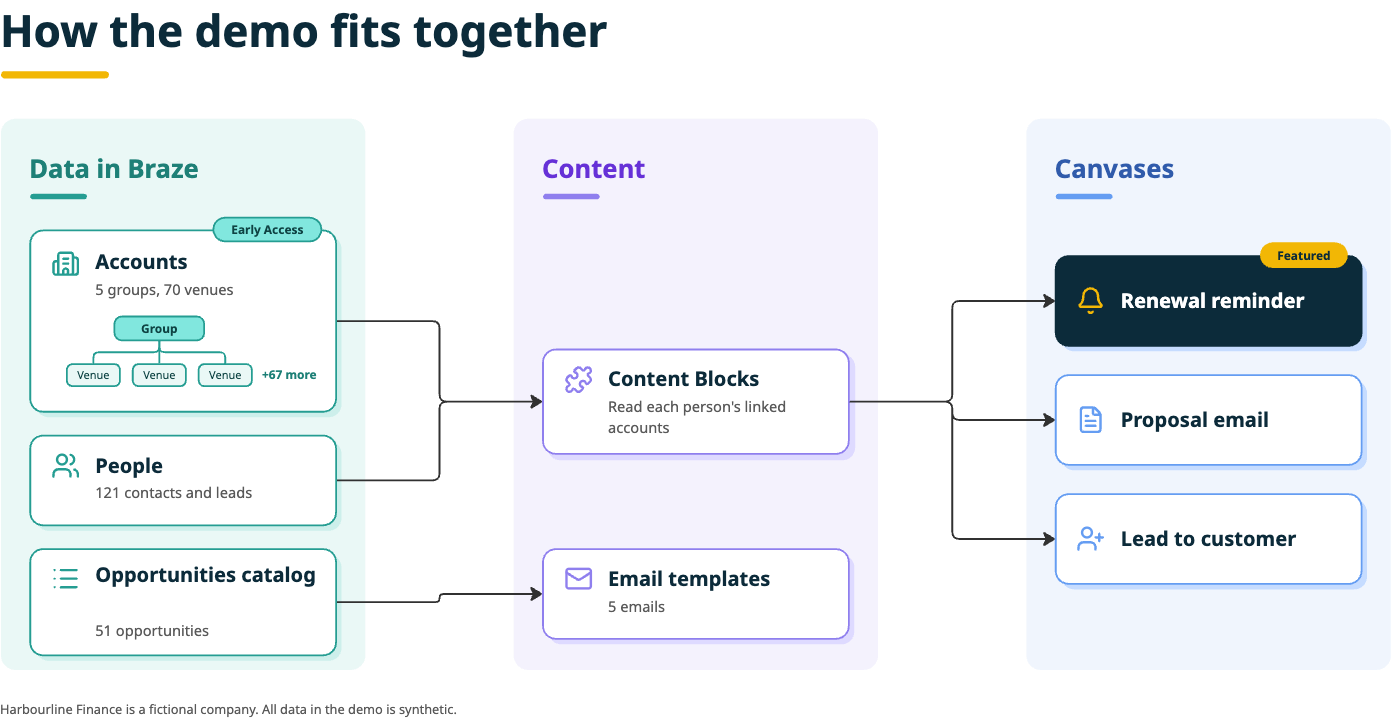
The lender in the demo is called Harbourline Finance. It has five hospitality groups, 70 venues, 121 contacts and leads, and 51 opportunities, with the opportunities held in a catalog. Everything in it is synthetic. Harbourline doesn’t exist, and neither do Sam and Priya.
We built three Canvases on top of that data. The renewal reminder is the centrepiece, and the other two cover opportunities moving stage and new leads.
One renewal email, two different answers
The renewal email is where it clicked for us.
When a venue’s finance term comes within 90 days of ending, the people linked to it get one email listing what’s due, soonest first. Sam’s email lists five venues out of his 25. Priya’s lists one, because only one of her three venues is due.
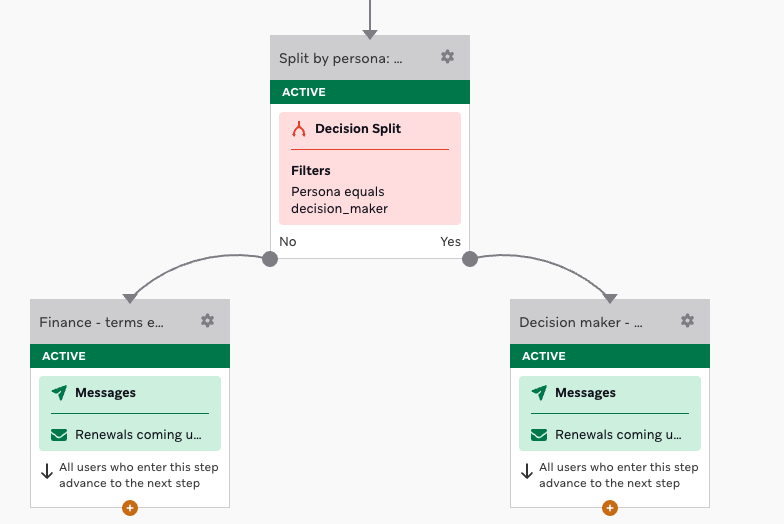
The list itself is one Content Block. It reads the accounts each person is linked to at the moment of sending, so each of them sees their own slice. The Canvas does split owners and finance contacts so each group gets a subject line that suits them, but both paths drop in the same block, so nobody had to build a template per role or per venue.
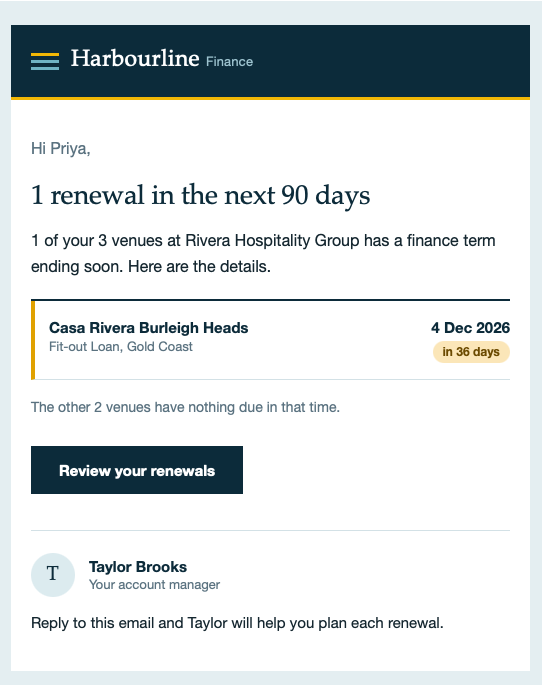
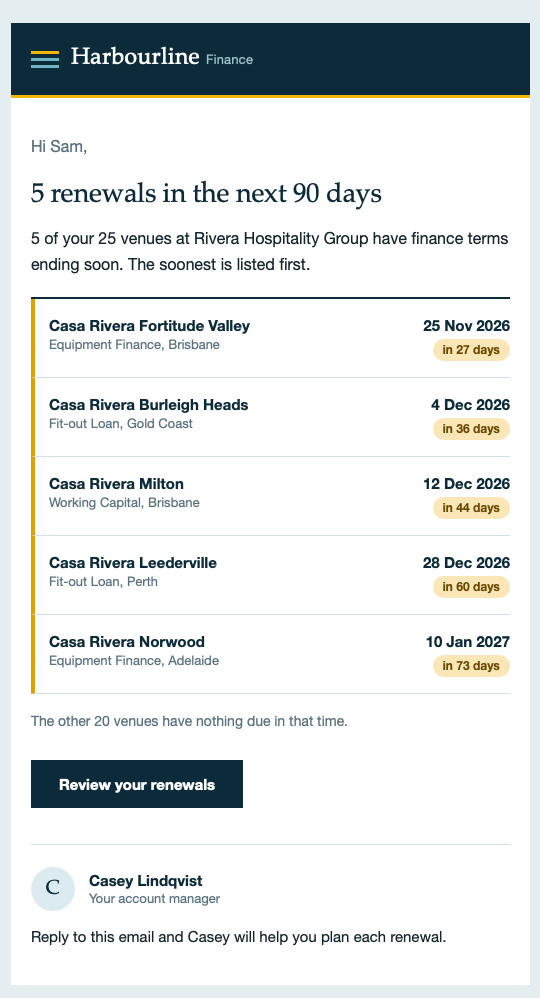
A venue counts as due when its term ends within 90 days and its status isn’t Renewed. The date does most of the work, so nobody has to remember to flag venues as they get close. A few small touches make the email easier to act on:
- It shows up to ten venues, soonest first, and adds a line saying how many more are due if there are extra.
- A New tag marks any venue that has entered the 90-day window in the last week.
- It closes by telling the reader how many of their other venues have nothing due, which is reassuring when you own 25 of them.
- If nothing is due, the email says so in one line instead of showing an empty list.
Beyond renewals: proposals and new leads
The renewal email got the most attention, but the same pattern runs through the rest of the demo.
When an opportunity moves to the Proposal stage, an opportunity_stage_changed event carries it into a Canvas. The email looks the opportunity up in a catalog to show the venue, product, amount and expected decision date, then drops in a short snapshot of the venue from its account record. Decision makers and finance contacts each get a version written for them.
On the acquisition side, a lead whose score reaches 80 triggers a webhook. In a real setup it would alert the sales team, and in the demo it records the alert on the lead’s profile. When that lead converts and becomes a contact linked to an account, the Canvas is set up to send a welcome email confirming their account.
How it works, briefly
The account records and their links to people load through Braze’s Data Objects API. In a message, the data_object Liquid tag pulls in the accounts linked to the recipient, along with their fields, as long as the audience includes a calculated filter. We kept that logic in Content Blocks, so each piece, like the renewal list or the venue snapshot, drops into any template.
Opportunities live in a catalog, because Braze has no Opportunity object. Each row holds its account ID, stage, amount, product and close date. When an opportunity changes stage, an event carries its ID and the email looks up the rest.
Here’s the simplest version, which lists every account linked to the person receiving the message:
{% data_object account %}
{% for acct in data_objects %}
  {{ acct.name }}: {{ acct.finance_product }}, ends {{ acct.term_end_date | date: '%-d %b %Y' }}
{% endfor %}
And here’s the core of the renewal list, trimmed down. It counts days in Sydney time and skips anything already renewed:
{% data_object account %}
{% assign today_s = 'now' | time_zone: 'Australia/Sydney' | date: '%Y-%m-%d' | date: '%s' | plus: 0 %}
{% for acct in data_objects %}
  {% assign end_s = acct.term_end_date | time_zone: 'Australia/Sydney' | date: '%Y-%m-%d' | date: '%s' | plus: 0 %}
  {% assign days_left = end_s | minus: today_s | divided_by: 86400 %}
  {% assign status = acct.status | downcase %}
  {% if days_left >= 0 and days_left <= 90 and status != 'renewed' %}
    {{ acct.name }} is due in {{ days_left }} days
  {% endif %}
{% endfor %}
Both only return data when the audience includes a Data Object calculated filter. More on that below.
What caught us out
Some of this may change as Accounts matures.
The first live send of our renewal email told Sam he had no venues, even though his profile listed all 25. Account data only comes through to a message when the audience includes a Data Object calculated filter. Without one, the Liquid tag returns nothing, in previews and live sends alike. Once we added a filter to the segment behind the Canvas, Sam’s email listed his five renewals straight away.
There’s a limit to plan around too. A segment or Canvas audience can hold only one Data Object calculated filter, so every account condition has to sit inside that single filter. Filters also refresh about once an hour, so someone linked a minute ago may not match yet.
That’s also why our previews came up blank at first. Braze’s docs do mention it, in a single line about using a segment with account data for previews, but it’s easy to miss and it applies to live sends too. Once the audience had the filter, the preview showed account data too, which made the screenshots easy. Braze also flagged that account Liquid returned nothing in Canvas Context Steps, so we kept the logic in the message step.
What we’d like Braze to improve
Accounts is generally available now, and these are the gaps that mattered most in our build:
- Account fields only load when the Canvas or campaign audience includes an account-based segment. Account fields only load when the Canvas or campaign audience includes an account segment. Leave it out and Braze doesn’t warn you. The email still sends, just without the account details, which is how Sam ended up with an email saying he had no venues. We’d like Braze to load account data regardless or at least flag the missing segment in the editor.
- More than one calculated filter per audience. Every account condition has to sit in a single filter, which makes it hard to combine reusable filters like “hospitality accounts” and “renewal due”.
- Faster refresh for new links. Data object filters update hourly, so a contact linked a minute ago can miss an event-triggered send, like a welcome email straight after conversion.
- Account previews everywhere. Previews only show account data once the Canvas or campaign audience includes an account segment, and the Content Block editor’s preview is always blank. Picking an account to preview against would help.
- Custom relationship types. Every person-to-account link is
account_user. Banking needs brokers and guarantors as distinct relationships, and today they have to be squeezed into fields on that one link.
When to use it
Accounts isn’t the answer to every B2B question. If each customer has one broker or one company, a custom attribute and a catalog lookup will do the job with less setup.
It pays off when relationships are many to many and several people share the same business data. It also helps when you want to target people by facts about their business, like every owner with a loan coming up for renewal. A lot of B2B customers look like that, commercial lending clients included. B2C brands with a B2B edge fit too: households on a shared plan and joint bank accounts have the same shape.
Want to see it?
We’re happy to walk through the workspace with anyone looking at account-based messaging in Braze. Get in touch with the Composed team and we’ll set up a time.
Harbourline Finance is a fictional company, and all data in the demo is synthetic.